Shopify SEO Audit: What to Check, and Who Should Fix It

A Shopify SEO audit is a structured review of whether search engines can find, read and understand your store, and whether shoppers who land on it get what they expected. Done well, it ends with a short, prioritized list of fixes. Done badly, it ends with a 90-page PDF nobody opens. This guide shows what a good audit covers, how to run a basic one yourself, how to compare paid audit services, and where we fit in.
TL;DR
- A Shopify SEO audit checks three areas: technical health (can Google crawl you?), catalog and on-page content (are titles, descriptions and images right?), and off-page signals (who links to you?).
- Shopify handles many technical basics for you, so most small-store wins sit in product listings: titles, descriptions, images, stock status.
- Audit prices run from about $35 on freelance marketplaces to $3,000 or more at agencies. Look at scope, delivery time and whether anyone actually makes the fixes.
- An audit is a snapshot. Listings break again, so the audit needs a steady check after it.
- ShelfSparrow is a done-for-you service: a $297 one-time listing audit with fixes in 72 hours, then $29/month ongoing checks.
Table of Contents
- What a Shopify SEO audit actually is
- What Shopify already does for you
- How to run a Shopify SEO audit yourself
- The problems that show up most
- Can AI do the audit?
- What a useful audit report looks like
- How to compare Shopify audit services
- Etsy and other marketplaces
- What we do, and why we do it this way
- Ready for a clean-up?
- What to fix first
- FAQ
- Sources
What a Shopify SEO audit actually is
“SEO” means search engine optimization: making your pages easy for Google and other search tools to find and understand, so the right shoppers see them. An audit is a check-up. Nobody changes anything yet. You look for what is wrong, rank it by how much it matters, then fix it.
Shopify’s own guide describes the audit as a review of technical, catalog and off-page signals that decide whether a store can be found and understood. The 2026 edition also covers how AI-driven search tools discover products. Here is what each area means in plain words:
- Technical signals. Can Google reach your pages? Are there dead links, endless redirects (a link that forwards to another link that forwards again), or pages accidentally hidden from search?
- Catalog and on-page signals. Do your product pages have clear titles, useful descriptions, working images, correct prices and availability? Do collection pages (the category pages that group products) say what they sell?
- Off-page signals. Do other sites link to you? Is your brand mentioned anywhere besides your own store?
Most audit pages that rank for this topic go deep on the first area. They list 47 or 285 technical checks. That is useful for a store with thousands of pages. For a store with 30 to 300 products, the second area usually holds the biggest leaks.
What Shopify already does for you
Before you pay anyone to audit “technical SEO”, know what the platform covers. According to the Shopify Help Center, Shopify automatically generates canonical tags (a hint that tells Google which version of a page is the main one), a sitemap.xml file (a list of your pages for search engines) and a robots.txt file (instructions telling crawlers where not to go). Themes generate title tags and product schema markup (hidden labels that describe price, availability and reviews to search engines). SSL certificates, which give you the padlock in the browser, are on by default.
What you still control: page titles, meta descriptions (the short summary under a result in Google), URLs and image alt text (a written description of an image for screen readers and search engines). Shopify says merchants still need to monitor and tune technical SEO themselves.
One warning worth repeating. Shopify says its default robots.txt is optimal for SEO and that incorrect customization can cost you all of your traffic. If a freelancer or an app offers to “improve” that file, ask why first.
How to run a Shopify SEO audit yourself
You can do a first pass in an afternoon. Shopify’s technical guide lays out the order: set goals, pull a baseline, crawl the store, review the results, then fix and monitor. Here is a version for a small store.
1. Set a baseline
Open Google Analytics and Google Search Console (Google’s free tool showing how your site appears in search). Write down your organic traffic, the number of indexed pages and your top 10 pages. Without this, you cannot tell later whether the fixes worked.
2. Crawl the store
A crawler is software that visits every page of your site the way Google does and reports problems. Shopify’s example setup caps page titles at 58 characters, limits query strings to one, turns on near-duplicate detection and uses Googlebot Smartphone as the crawler identity. A query string is the part of a URL after a question mark, which often creates duplicate pages when shoppers filter products.
3. Compare what exists with what Google sees
Shopify’s 2026 checklist suggests comparing four lists: published URLs, crawlable URLs, rendered content and indexed URLs. Gaps point to missing products, orphaned collections (pages nothing links to), blocked resources, broken links and content that only appears after JavaScript runs. The same checklist says to review 4xx and 5xx errors (page not found and server errors), redirect chains and canonicals, and to check the Pages report in Search Console.
To see one page the way Google does, Google points site owners to the URL Inspection Tool in Search Console.
4. Check your product and collection pages
This is where small stores gain the most. For your top sellers, review the title, description, benefits, specifications, price, availability, images, category, variants and identifiers. For collections, check that each page has a clear purpose, a real description and the right products in it. Shopify’s checklist covers both in the catalog section.
A quick test: read your product title out loud as if you were a shopper typing into Google. Does it say what the item is? Or is it only a brand name and a code?
5. Test speed
Core Web Vitals are Google’s three measures of how a page feels to use. Shopify’s 2026 guidance gives these targets: Largest Contentful Paint (how fast the main content shows) within 2.5 seconds, Interaction to Next Paint (how fast the page responds to a tap) within 200 milliseconds, and Cumulative Layout Shift (how much things jump around while loading) of 0.1 or lower. Shopify scores real-user data at the 75th percentile, meaning three in four visits should meet the target.
6. Strengthen internal links
Internal links are links from one page of your store to another. Make sure your navigation, collections, products and blog posts link to each other with plain HTML links. A product that nothing links to is hard for anyone to find.
The problems that show up most
Shopify’s checklist names the usual suspects: missing or unexpected sitemap URLs, errors and redirect chains, blocked resources, accidental noindex tags (a setting that tells Google to skip a page), wrong canonicals, duplicate or parameter-heavy URLs, orphan pages, JavaScript-dependent content and poor Core Web Vitals. The fixes it recommends are links, redirects, canonical and robots rules, and rendering, followed by a recheck in Search Console.
In our experience with small catalogs, the daily leaks are simpler:
- Typos in titles and descriptions.
- Broken or missing product images.
- Duplicate titles across variants.
- Thin descriptions copied from a supplier.
- Products showing “in stock” that sold out last week, or the reverse.
None of these need a developer. They need someone to look, and to keep looking.
Can AI do the audit?
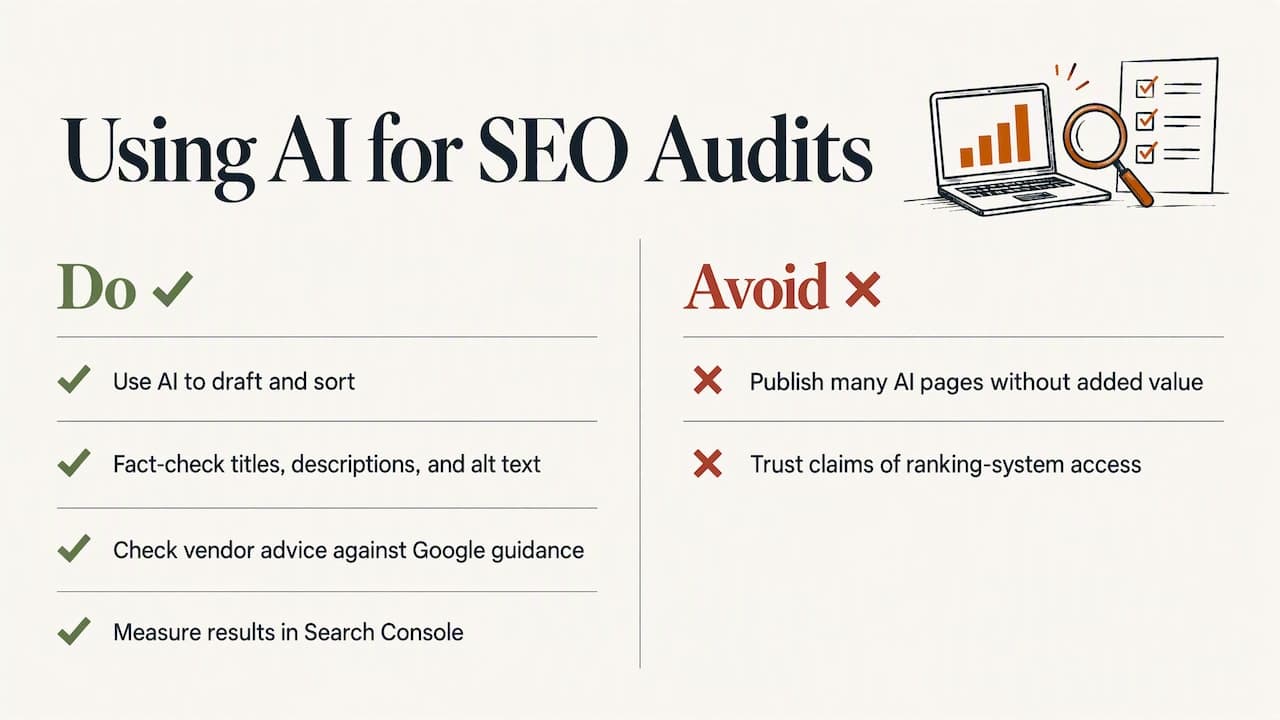
People ask this a lot, and the honest answer is: partly. An AI assistant can read a crawl export, group issues and draft better titles. But Google’s guidance on generative AI content warns that models may hallucinate inaccuracies, and says AI-written content needs manual fact-checking, including title elements, meta descriptions, structured data and image alt text. Google also says generating many pages with AI without adding value may break its scaled content abuse spam policy.
So use AI for drafting and sorting. Have a person verify every title, description and alt text before it goes live.
Be careful with any tool or service that claims inside knowledge of Google’s rankings. Google’s 2026 guide on AI features says third-party tools do not have access to its internal ranking or AI systems and recommends checking their advice against official guidance. Measure results in Search Console, not in a vendor’s promise.
One more point from Google: programmatic descriptions can be fine when hand-writing every one is impractical, as long as they are human-readable and specific to each page. For a 500-product store, that is a relief.
What a useful audit report looks like
Shopify’s own guidance treats the output as a categorized, prioritized plan, not a list of observations, followed by monitoring after the changes go live. Use that as your yardstick. A good report:
- Sorts findings by impact, so you know what to do first.
- Uses plain words, with every term explained.
- Shows the exact page and the exact fix.
- Says who will make the change.
- Says what happens afterward.
Point 4 is the one most reports skip. A PDF that lists 140 issues leaves you with 140 tasks.
How to compare Shopify audit services
Audit services fall into a few lanes. Prices below are as published or as we understand them from each provider’s public positioning, so check each provider’s own page before you buy. Prices change.
| Option | Typical price | Delivery | What you get | Ongoing watch |
|---|---|---|---|---|
| Freelancers on Upwork and Fiverr | $35 to $1,299 | Varies by seller | Mostly a report only | Usually none |
| Focused Developer | €150 | Report in 5 business days | Shopify audit, money back if fewer than 5 fixes are found | Not listed |
| OptraSeven | $149 founding offer, $297 regular | Not listed | Deep audit from a Shopify CRO agency (conversion rate optimization, meaning turning more visitors into buyers), aimed at brands doing $200k to $5M a year | No $29/month style watchdog |
| Lydia | $497 one-time | Report in 48 hours | AI store management for Shopify and Etsy, audits across 9 categories | $1,997/month |
| Speechify Boost | Check provider | Weekly digest | Audits products and drafts fixes (titles, copy, photos, meta) for you to approve | Weekly digest |
| CRO agencies | $1,500 to $3,000 or more | Weeks | Tactical audit and strategy | Separate retainer |
| ShelfSparrow | $297 audit, $29/month ongoing | Fixes in 72 hours | Titles, SEO, typos and broken images fixed for you | Listing checks, stock alerts, daily summaries |
A few notes on reading that table.
Report-only versus fixed. Freelance audits are mostly reports. You pay, you get a document, and the work is yours. Speechify Boost goes a step further by drafting fixes, but you still approve each one. We fix on the spot, so by the time you read our report, the typos and broken images are already gone.
Price against your size. OptraSeven’s deep audit is a fair offer, but it is built for brands doing $200k to $5M a year. A founding price of $149 against a $297 regular price looks cheaper than ours. It is a different lane, and it has no low-cost monthly watch behind it.
The ongoing number. Lydia’s $497 audit is a real product with a 48-hour report. Then the ongoing plan is $1,997 a month. Ours is $297 once, then $29 a month. For a store with a modest catalog, that gap decides the choice.
Money-back terms. Focused Developer’s guarantee, a refund if fewer than 5 fixes are found, is a reasonable promise for a small-shop audit. Ask any provider what happens if the audit finds little.
Monitoring tools are a different thing
Prediko, Sellbrite and StoreClaw sometimes come up in the same searches. They are software: you log in, set things up and read the dashboards yourself. That suits teams with someone who has time to run a tool. If you would rather have someone else handle the fixing, a service fits better than another dashboard.
Questions to ask any provider
- What exactly is in scope: product pages, collections, technical, speed, apps?
- Who makes the fixes, and how long does that take?
- Is the report written in plain English, ranked by impact?
- What happens after delivery? Is there a recheck?
- What do I pay in month two?
Etsy and other marketplaces
The same logic works beyond Shopify. Etsy sellers search for an Etsy SEO audit, and Amazon, Walmart, eBay and WooCommerce sellers have the same worry: listing quality. A listing audit checks titles, tags or keywords, descriptions, photos and attributes against how shoppers on that platform search. The details differ by platform, so ask any auditor to show examples from your marketplace. We audit any online store or marketplace, including Amazon, Walmart, eBay and WooCommerce, alongside Shopify and Etsy.
What we do, and why we do it this way
ShelfSparrow is a done-for-you store auditing service, not software. You do not learn a dashboard. Our $297 one-time listing audit covers titles, SEO, typos and broken images, and we fix them within 72 hours. You get a plain-English report, ranked by what matters most.
Then the $29/month plan keeps a steady eye on your store: listing checks, low-stock alerts and a short daily summary. Routine errors get corrected as they appear. You read one summary a day instead of checking every listing yourself.
Perspective: an audit is a habit, not an event
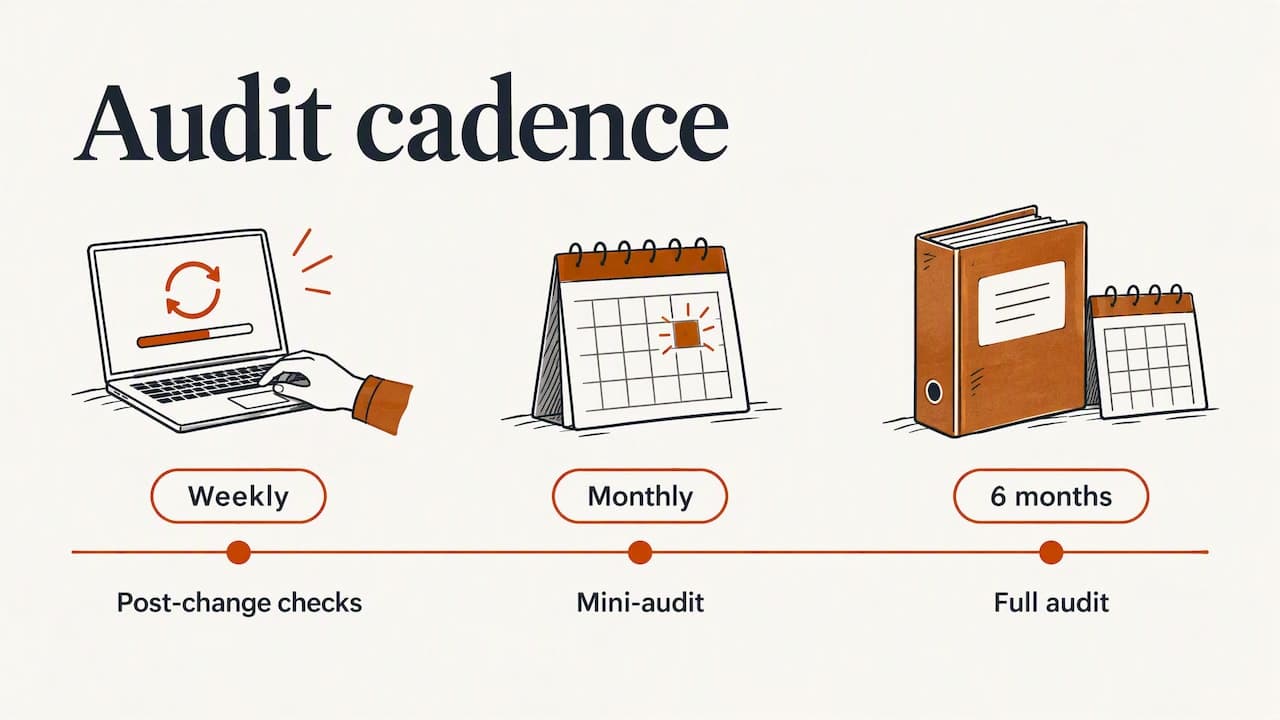
Shopify itself recommends weekly checks after changes, a monthly mini-audit and a full audit every six months. We think that is right, and it is also where small teams fall behind. Nobody has the time. A new batch of products goes up with a typo in the title. An image link breaks after a theme change. A best seller runs low on a Friday night.
We built our service around that gap. Our view is that most small stores do not need 285 checks. They need the 20 that matter, done well, and then watched every day. We also believe a report is only half a service. If we find a typo, we fix the typo. If we find a stock problem, we flag it before it costs you a sale.
We are also careful about what we promise. Nobody can guarantee rankings, and we do not. We promise tidy, accurate listings and a calmer week.
— Francis
Ready for a clean-up?
If you would rather have your listings fixed than read another checklist, start with our store audit. It is $297 one time: titles, SEO, typos and broken images corrected within 72 hours, with a plain-English report on what we found. After that, listing checks, stock alerts and daily summaries are $29/month.
You can see everything we offer on the ShelfSparrow site.
What to fix first
If you do only a few things this week, do these in order:
- Open Search Console and look at the Pages report. Note any pages that are not indexed and ask why.
- Read the titles of your 10 best sellers. Fix typos, duplicates and codes-only names.
- Check that every image loads on every top product, on mobile too.
- Compare stock status on your store with your real inventory.
- Test your homepage and top product page for speed.
- Put a 30-minute monthly reminder in your calendar, or hand the job to someone who will not forget.
That list covers more real-world loss than most technical checklists. The rest can wait until the basics are clean.
FAQ
How much does a Shopify SEO audit cost?
Published prices range widely. Freelancers on Upwork and Fiverr run from $35 to $1,299, and agency audits run $1,500 to $3,000 or more. Our audit is $297 one time. Compare what is included, not only the price.
How often should I audit my store?
Shopify recommends a monthly mini-audit and a full audit every six months, with weekly checks after you make changes. Small stores often skip these because the work is dull. A daily or weekly automated check makes the schedule easier to keep.
Can I do a Shopify SEO audit for free?
Yes. Search Console, Analytics and a free crawl of a small site cover the basics, and the steps above show the order. The cost is your time, plus the risk of missing what you did not know to look for. Paying makes sense when you would rather have the fixes made for you.
Does an SEO audit guarantee more traffic?
No. Google says third-party tools cannot see its internal ranking systems, so be wary of any guarantee. A good audit removes errors and makes your listings clearer, which gives search engines and shoppers less reason to skip you.
Is a listing SEO audit the same for Etsy?
The idea is the same: titles, tags, photos and descriptions that match how buyers search. The details depend on the platform. We audit Etsy shops, as well as Amazon, Walmart, eBay and WooCommerce stores.
Sources
- Ecommerce SEO Audit: Shopify Checklist (2026), Shopify
- Technical SEO Audit: A Checklist for Ecommerce Sites, Shopify
- SEO overview, Shopify Help Center
- Editing robots.txt, Shopify Help Center
- SEO Starter Guide, Google Search Central
- Guidance on generative AI content, Google Search Central
- Guide to optimizing for generative AI features, Google Search Central
- How to write meta descriptions, Google Search Central